
Wayship API
Wayship shows what you're up to (your Discord status, the song you're playing, your phone's battery, your widgets) on your new tab and on a public page at yourname.wayship.link. This API gives the same data to your own scripts, bots, status bars and websites, live, and lets your scripts send notifications to your phone and computer.
- Base URL:
https://wayship.link/api - Live updates:
wss://wayship.link/api/_ephaptic(Ephaptic RPC over WebSocket) - Formats: JSON in and out (one ntfy-style route also takes plain text)
- These docs: wayship.link/docs · Markdown: wayship.link/docs.md · for AI agents: wayship.link/llms.txt
Quick start
Anyone's public data, no key needed:
GET /api/users/uukelele
Your own data, including what isn't public: make an API key on the Developer page and send it as a bearer token:
curl -H "Authorization: Bearer wsk_…" https://wayship.link/api/users/your-name
Send yourself a notification (key with the "Send notifications" permission):
curl -H "Authorization: Bearer wsk_…" -H "Title: Hello" -d "From my script" https://wayship.link/api/notify
Concepts
- Account / user: everyone has an id (Discord-era accounts: a number like
1508933272602673183; newer ones:w+ 16 hex characters) and a page name (handle), likeuukelele. Anywhere the API takes{key}, either works. - Public page:
https://<handle>.wayship.link. While it's switched on, whatever widgets are on it are public, through the page and through this API. While it's off, nothing about the person is public. - Widgets: the tiles on the new tab and the page (Discord profile, now playing, phone, GitHub, custom widgets…). Each has an
idand atype. - Live state:
presence(Discord status and activities),media(now playing, from the desktop app),phone(battery etc., from the Android app). They update in real time. - Devices: the desktop and Android apps. They send live state, and receive notifications and things you send them.
- Friends: people you've added. They see what's public, plus whatever you share with friends (your choice, in Privacy).
Authentication
| You send | Who you are | What you can do |
|---|---|---|
| nothing | anyone | Read public data (what's on someone's page). |
Authorization: Bearer wsk_… (API key) |
its owner | What the key's permissions allow: read (all your data, every live update) and/or notify (send, list, delete notifications). Nothing else. |
Authorization: Bearer <session token> |
you | Everything the web app does. Session tokens expire after about two weeks: use API keys for scripts. |
Authorization: Bearer wsa_… (app token) |
a connected app | Only that app's own peers and its basic profile info (/apps/me, /peers/*). See Connected apps. |
| device token | that device | Used by the Wayship apps. |
API keys start with wsk_, never expire, and stop working the moment you revoke them on the Developer page. Keep them out of web pages and public repos. A key used where it isn't allowed counts as no sign-in at all (401, or only public data).
On the WebSocket, authenticate in the connection's auth object: { key: "wsk_…" }, { token: "<session>" }, or, for public data only, { user_id: "…" } / { username: "page-name" }.
Signing in
Accounts sign in with an email or a username and a password; Discord is optional (only needed for live Discord status, games and music). Browsers can also use a Discord redirect. These are plain JSON endpoints:
| Endpoint | Body | Returns |
|---|---|---|
POST /api/auth/signup |
{ username, email?, password, history?, device?, device_name? } |
{ token, session, recovery_code, access_token?, refresh_token?, expires_in? } |
POST /api/auth/login |
{ login, password, device?, device_name? } |
the same as sign-up (without a recovery code) |
POST /api/auth/complete-redirect |
{ redirect, device?, device_name? } (signed in) |
{ redirect_to } |
POST /api/auth/password/forgot |
{ email } |
{ ok, detail } |
POST /api/auth/password/reset |
{ new_password, token? } or { new_password, login, recovery_code } |
{ token, session, recovery_code? } |
POST /api/auth/credentials |
{ email?, clear_email?, new_password?, current_password? } (signed in) |
the updated session |
POST /api/auth/recovery-code |
{ current_password? } (signed in) |
{ recovery_code } |
POST /api/auth/discord/link-url |
none (signed in) | { url } |
DELETE /api/auth/discord |
none (signed in) | the updated session |
device is "desktop" or "phone" when a companion app is signing in; it then also gets access_token, refresh_token and expires_in. email is optional at sign-up: a username and password are enough, and the returned recovery_code (WS-XXXX-XXXX-XXXX-XXXX) is the way back in without email. Show it once and only once.
Users
Get a user
GET /api/users/{key}
{key} is an id or a page name. Without a key you get the public view; as the owner (API key with "read", or a session) you get everything.
{
  "user_id": "1508933272602673183",
  "presence": {
    "discord_status": "online",
    "activities": [
      { "type": 4, "name": "Custom Status", "state": "shipping wayship", "emoji": { "id": null, "name": "🔴" } },
      { "type": 0, "name": "ELDEN RING", "details": "Exploring Liurnia", "state": "Level 87", "application_id": "…", "timestamps": { "start": 1791974000000 }, "assets": { "large_image": "…", "large_text": "…" } }
    ]
  },
  "media": {
    "title": "Higher", "artist": "Clean Bandit", "album": null, "art_url": "https://…",
    "duration_ms": 174520, "started_at": 1791974995653, "paused_at": null,
    "current_lyric": null, "lyrics": [{ "t": 500, "text": "…" }], "source": "desktop"
  },
  "phone": { "label": "Pixel", "battery": 92, "charging": true, "temperature_c": 35.9, "battery_saver": false, "calendar": [] },
  "last_seen": { "status": "online", "active": true, "at": 1791974996641 },
  "profile": {
    "user_id": "1508933272602673183", "display_name": "uuke", "avatar_url": "https://…", "handle": "uukelele",
    "page_url": "https://uukelele.wayship.link", "page_enabled": true, "plan": "plus",
    "page": { "custom_bio": "…", "links": [{ "label": "Blog", "url": "https://…", "icon": "globe" }], "…": "…" },
    "layout": { "widgets": [ { "id": "nowplaying", "type": "nowplaying", "page": true, "…": "…" } ] }
  },
  "widgets": [ { "id": "monkeytype-yka3q1", "type": "monkeytype", "title": "typing", "data_url": "https://wayship.link/api/users/1508933272602673183/widgets/monkeytype-yka3q1" } ],
  "variables": { "mode": "home", "steps_today": 8421 },
  "buttons": [ { "id": "a813a3b826a7e", "label": "Wave", "icon": "hand", "who": "everyone", "input": { "mode": "off", "label": "", "max_len": 100 }, "confirm": "", "needs_sign_in": false } ]
}
- Missing means private or empty. A part that isn't public (or has nothing right now) is left out, or
null. Always check before using it. presence.activitiesfollow Discord's gateway shape:type0 playing, 1 streaming, 2 listening (Spotify), 3 watching, 4 custom status, 5 competing. Ids are strings (Discord ids are too big for JavaScript numbers). Custom emoji:https://cdn.discordapp.com/emojis/{id}.webp(.gifwhenanimated).media: the position isnow - started_atwhile playing; whenpaused_atis set, it'spaused_at - started_at. Times are unix milliseconds.last_seen: when they were last online on Discord (at, unix ms). On by default; people can turn it off.widgets: what you may read, each with its data address (below).variables: the person's account variables you may see,{ name: value }. Each variable has its own privacy level: the owner (and their keys with "read") get all of them, friends the ones shared with friends or everyone, anyone else the ones shared with everyone, and none while the page is off.buttons: the person's buttons you may press. The owner gets all of theirs; friends the ones for friends or everyone; anyone else the ones for everyone; nobody but the owner while the page is off.needs_sign_in: it's only for people signed in to Wayship, and you aren't.
GET /api/users/by-name/{name} is the same, under its old address.
Discord profile
GET /api/users/{key}/discord
Banner, badges, bio, connections (GitHub, Steam…) and similar, for people whose page is on. Cached for a few minutes.
Widgets
List
GET /api/users/{key}/widgets
{ "user_id": "…", "widgets": [ { "id": "github-opit6b", "type": "github", "title": "gh stats", "newtab": true, "page": true, "data_url": "https://…" } ] }
Without a key: the page's widgets. With the owner's key: every widget in use, including new-tab-only ones.
One widget's data
GET /api/users/{key}/widgets/{id or type}
Use the id, or the type when there's only one of that kind (/widgets/monkeytype). With more than one, you get 409 and their ids:
{ "error": "There's more than one custom widget: use one of these ids.", "widgets": ["custom-1zg921", "custom-diig47"] }
What comes back depends on the type:
| Type | Response |
|---|---|
github |
{ username, total, days: [{ d: "2026-10-12", l: 0-4 }] } (contribution levels, a year) |
monkeytype |
{ bests: [{ label: "15s", wpm, acc }], stats: { tests, hours, streak } } |
chess |
ratings and recent games (chess.com or Lichess) |
duolingo, steam, anilist, letterboxd |
profile stats from that service |
weather |
{ location: { latitude, longitude, label } } (rounded); fetch the forecast from Open-Meteo |
prices, wallet |
crypto prices / wallet balances |
recent |
recently played tracks |
feeling |
the person's mood |
custom |
{ name, design, data, error, fetched_at, vars, buttons }: data holds only the fields the design shows; vars the account variables it shows ({{var.<name>}}), with null for any you may not see; buttons the buttons its button elements press, { id: button }. Button elements you may not press are taken out of the design. |
variable |
{ id, type, title, config: { name, label, prefix, suffix, style }, value, vars }: value is null unless the variable's privacy level lets you see it |
button |
{ id, type, title, config: { automation, label, icon, style, caption }, button }: the button it presses. Only readable by people who may press it. |
sports |
{ id, type, title, config: { team, name, sport, league, logo, show_pitch, show_commentary }, sports }: the followed team's snapshot, below. ?compact=1 leaves out line-ups, shots and commentary (the Android widgets use it). |
everything else (countdown, note, clock, image, time, …) |
{ id, type, title, config }: its settings, e.g. a countdown's { title, at, emoji } |
nowplaying, phone, calendar, profile, activities |
the same, plus live: the matching live state |
Fetched data is cached on the server (minutes to an hour, depending on the source). 403 = that widget isn't public; 404 = no such widget.
The Android app's home-screen widgets (0.5+) read these same two addresses as the owner, with the phone's device token. Custom widgets come back as their design plus the data; the app fills in the {{fields}} (and {{var.<name>}}) itself, like the web does.
Sports
The Sports widget follows one team live: football from FotMob,
other sports (NFL, NBA, WNBA, NHL, MLB, college football and basketball, rugby, Formula 1)
from ESPN. Wayship polls each followed team once for everybody and
keeps a snapshot, which is what the widget's data has (sports):
{
  "team": { "key": "fotmob:10260", "name": "Manchester United", "logo": "https://…", "sport": "football", "league": "Premier League" },
  "provider": "fotmob", "source": "FotMob", "updated": 1792605146536, "rev": 41,
  "live": {
    "id": "fotmob:6106410", "sport": "football", "league": "Champions League", "status": "live", "status_text": "67’",
    "clock": { "seconds": 3985, "at": 1792605146536, "running": true, "max": 90 },
    "home": { "key": "fotmob:10171", "name": "Como", "logo": "https://…", "color": "#005ea9", "score": 3 },
    "away": { "key": "fotmob:10260", "name": "Manchester United", "score": 0 },
    "events": [ { "id": "g14612011", "type": "goal", "minute": "2'", "side": "home", "player": "Nico Paz", "assist": "Lucas Da Cunha", "score": [1, 0] } ],
    "lineups": { "home": { "formation": "4-2-3-1", "players": [ { "name": "Jean Butez", "number": "1", "x": 0.5, "y": 0.1, "rating": 6.9, "events": [] } ] }, "away": { "…": "…" } },
    "shots": [ { "side": "home", "x": 0.39, "y": 0.85, "type": "goal", "player": "Nico Paz", "min": 2, "xg": 0.07 } ],
    "momentum": [[1, -11], [2, 22]], "stats": [ { "key": "possession", "title": "Possession", "home": 64, "away": 36 } ],
    "commentary": [ { "minute": "67'", "text": "…", "highlight": false } ],
    "venue": "Stadio Giuseppe Sinigaglia", "url": "https://www.fotmob.com/match/6106410"
  },
  "last": { "…": "the last result; with events, stats and player of the match while it's under a day old (recent: true)" },
  "next": [ { "id": "fotmob:5795493", "start": 1792854000000, "status": "pre", "home": { "…": "…" }, "away": { "…": "…" }, "league": "Premier League" } ]
}
- Teams have
name,shortand (football, ESPN)abbr("MUN") for tight spaces; races haveshort_name("United States GP", without the title sponsor). status:pre,live,break(half time, between periods),post,off(postponed or cancelled). The clock ticks fromsecondssince you got it whilerunning.- Positions (
x,yof players and shots) are 0–1 across and along the pitch, from the team's own goal; shots are towardsy = 1. - Other sports have
situation: American footballdown_distance,possession,yard_line,red_zone,drive; baseballinning,outs,balls,strikes,bases,batter,pitcher; basketballleaders; racingorder(the running order); alllast_play. errorandstale: truewhen the source can't be reached right now (the last snapshot stays). Football falls back to ESPN while FotMob is down (provider: "espn").
Finding a team: GET /api/sports/search?q=arsenal → { "teams": [{ key, name, logo, sport, sport_name, league }] } (anyone; 30 searches a minute).
Live updates (WebSocket)
Connect once and get every change as it happens. Use the Ephaptic client (JavaScript: npm i @ephaptic/client, Python: pip install ephaptic).
import { connect } from "@ephaptic/client";

const client = connect({ url: "wss://wayship.link/api/_ephaptic", auth: { key: process.env.WAYSHIP_KEY } });
client.connect(); // Node only: browsers connect on their own

const state = await client.snapshot(); // { presence, media, phone }: everything right now (keys with "read")
client.on("StateEvent", ({ kind, data }) => {
  console.log(kind, data);
});
import asyncio, os
from ephaptic.client import connect

async def main():
    client = await connect("wss://wayship.link/api/_ephaptic", auth={"key": os.environ["WAYSHIP_KEY"]})
    print(await client.snapshot())

    @client.on("StateEvent")
    def update(kind, data):
        print(kind, data)

    await asyncio.Event().wait()

asyncio.run(main())
Public data works without a key: auth: { username: "uukelele" } (or user_id). You then get only what's public, as it changes. Start from GET /api/users/{key}, then apply each event.
Each StateEvent has a kind and the new data (null = it ended, e.g. the music stopped):
kind |
data |
|---|---|
presence |
{ discord_status, activities } |
media |
now playing (shape above), or null |
phone |
phone state (the calendar is left out unless it's public) |
calendar |
{ events } (to visitors, when only the calendar is public) |
kit |
{ kit, data }: a custom widget's new data (webhook widgets) |
sports |
{ team, rev, base, set } (or { team, rev, base: 0, full }): a followed team's match changed: apply set ("live.clock": {…}, "live.events": […], "next": […]: a key, or a key inside live / last) to the snapshot you have if its rev is base, otherwise fetch the widget again. About every 15 seconds while the team plays. To the owner, and to page visitors when that team's Sports widget is on the page (friends who may see the widget get it as a FriendEvent). |
buttons |
{}: the person's buttons changed (one was turned on or off, edited or deleted): fetch the ones you may press again. To the owner, and to page visitors while the page is on. |
variables |
{ name: value }: account variables that changed (null = deleted, or no longer shared with you). The owner gets every change; visitors only the ones shared with everyone, while the page is on (friends get theirs as a FriendEvent). At most a few a second: bursts are merged, the last value wins. |
notification |
a notification you sent yourself (owner and "read" keys only) |
update |
{ what }: some of your account's data changed, so reload it: history, analytics, devices, keys, account (your plan), variables (a variable's privacy level). Only to your own signed-in sessions, not keys. |
The client reconnects by itself. After a reconnect, call snapshot() (or the GET) again in case you missed something.
Notifications
Send yourself notifications from scripts, servers and shortcuts. They pop up on the Wayship apps on your phone and computer (version 0.2 or newer), like ntfy but private to your account: only you, or your API keys, can send to you.
Needs a session or an API key with the notify permission.
Send (JSON)
POST /api/notifications
Content-Type: application/json

{ "title": "Backup finished", "message": "Saved 3.2 GB in 4 minutes", "priority": 4, "tags": ["white_check_mark", "server"] }
The same handler is the RPC function send_notification on the WebSocket:
await client.send_notification({ title: "Build failed", message: "3 tests failed", priority: "urgent", tags: ["rotating_light"] });
Send (plain text, ntfy-style)
The body is the message; options go in headers (or query parameters with the same names). ntfy's header names and short forms work.
curl https://wayship.link/api/notify \
  -H "Authorization: Bearer $WAYSHIP_KEY" \
  -H "Title: Disk almost full" \
  -H "Priority: high" \
  -H "Tags: warning" \
  -d "Only 4 GB left on /home"
Headers: Title (t), Priority (p), Tags (ta, comma-separated), Markdown (md: yes), Click, Icon, Attach (a), Filename (f), Actions, Delay (In, At), Topic, Sequence-ID (sid), Devices. A JSON body (Content-Type: application/json) works on /api/notify too.
Fields
| Field | Type | |
|---|---|---|
message |
string, ≤ 4096 | Required unless attach is given. |
title |
string, ≤ 250 | |
priority |
1–5, or min low default high urgent (max) |
Default 3. 5 can sound even in Do Not Disturb, where allowed. |
tags |
≤ 10 strings | Emoji names (warning ⚠️, tada 🎉, white_check_mark ✅, rotating_light 🚨, +1 👍…) become emojis before the title; the rest show as tags. |
markdown |
bool | The message is Markdown (apps show it as plain text). |
click |
URL | Opened when the notification is tapped (http, https, mailto). |
icon |
https URL | The notification's picture. |
attach |
URL | A file; images are shown in the notification. filename names it. |
actions |
≤ 3 | Buttons, below. |
topic |
string, ≤ 64 | A label to group by, like backups. |
sequence_id |
string, ≤ 64 | Send again with the same id to replace the earlier notification on devices. |
delay |
30s, 10m, 2h, 1d, 1h30m, unix seconds, or ISO time |
Up to 3 days ahead. |
devices |
"all" (default), "phone", "desktop", or device ids |
Who gets it. |
Buttons:
[
  { "action": "view", "label": "Open", "url": "https://example.com", "clear": false },
  { "action": "http", "label": "Restart", "url": "https://api.example.com/restart", "method": "POST", "headers": { "X-Token": "…" }, "body": "{}", "clear": true },
  { "action": "copy", "label": "Copy code", "value": "123456" }
]
view opens the link, http sends the request from the device, copy copies value. clear: true dismisses the notification afterwards. As a header (ntfy's short format): Actions: view, Open, https://example.com; http, Restart, https://api.example.com/restart, method=POST, clear=true.
Response: the stored notification:
{ "id": 42, "status": "sent", "time": 1791974462, "deliver_at": 1791974462, "title": "Backup finished", "message": "Saved 3.2 GB in 4 minutes", "priority": 4, "tags": ["server"], "emojis": ["✅"], "markdown": false, "actions": [], "devices": "all" }
status is scheduled for delayed ones.
History and deleting
GET /api/notifications?limit=50
DELETE /api/notifications/{id}
DELETE /api/notifications
Listing needs "read"; deleting needs "notify". Deleting removes it from history, cancels it if it's still scheduled, and clears it from devices. RPC: list_notifications(limit), delete_notification(id), clear_notifications(), notification_usage().
Limits
| Free | Plus | |
|---|---|---|
| Notifications a day | 100 | unlimited |
| History kept | 7 days | 30 days |
| Rate | 5 a second | 5 a second |
Going over: 429 with a message saying when it resets (midnight UTC).
How the apps receive them
The apps long-poll GET /api/notifications/wait?since=<cursor>&timeout=50 with their device token, and answer the moment something arrives. You don't need this unless you're building your own receiver; see the receiving protocol.
Apps with home-screen widgets also ask for state events there (kinds=…,state): a small "your status, music or custom widget data changed" signal, at most one every 30 seconds, so the widgets refresh just what changed. See live changes for home-screen widgets.
Send to device
Send links, text, files and your clipboard to your own devices, or make your phone ring. Things arrive on the Wayship apps on your phone and computer (version 0.3 or newer) and on the Send page at wayship.link/app/devices/send. Like the rest of Wayship, it's private: you can only send to yourself.
Needs a session or an API key with the notify ("Send notifications") permission. Listing your history needs read.
Send a link or text
curl https://wayship.link/api/transfers \
  -H "Authorization: Bearer $WAYSHIP_KEY" \
  -H "Content-Type: application/json" \
  -d '{ "kind": "link", "to": "phone", "url": "https://example.com", "title": "Read later" }'
kind |
Fields | What happens |
|---|---|---|
link |
url (http/https, ≤ 4000), title? |
A notification that opens it. |
text |
text (≤ 20,000 characters) |
A notification with a Copy button. |
clipboard |
text |
Put on the device's clipboard (on Android, tap the notification to copy). |
ring |
The device rings loudly until stopped (2 minutes at most). | |
ring_stop |
Stops it. |
to: "all" (default: every device and the Send page), "phone", "desktop", "web" (the Send page in your browsers), or a list of device ids (["12", "web"]), from GET /api/transfers/targets.
The same function over the WebSocket: client.send_transfer({ kind: "text", to: "desktop", text: "hi" }).
Send a file
The body is the file; name it with X-Filename (percent-encode non-ASCII names):
curl https://wayship.link/api/transfers?to=phone \
  -H "Authorization: Bearer $WAYSHIP_KEY" \
  -H "X-Filename: report.pdf" \
  -H "Content-Type: application/pdf" \
  --data-binary @report.pdf
A form upload works too: curl -F to=phone -F [email protected] -H "Authorization: Bearer $WAYSHIP_KEY" https://wayship.link/api/transfers. One file per request; title adds a note.
Files over 90 MB (Plus) go in parts, since one request can be at most 100 MB:
POST /api/transfers/uploadswith{ "name", "size", "mime", "to", "title" }→{ "upload": "u_…", "part_size": 33554432 }.PUT /api/transfers/uploads/u_…?offset=<bytes sent so far>with the next part as the body, in order. Each answer is{ "received": n }; a wrong offset answers 409 with the rightreceived.- The last part answers with the transfer.
The answer
{
  "id": "t_Qm3r8w1xYzAb", "kind": "file", "time": 1791900000, "expires": 1791986400,
  "sender": { "id": null, "name": "Script", "kind": "api" },
  "targets": [ { "id": "12", "name": "Pixel 8", "kind": "phone" } ],
  "title": "", "url": null, "text": null,
  "file": { "name": "report.pdf", "size": 48213, "mime": "application/pdf",
            "url": "https://wayship.link/api/transfers/t_Qm3r8w1xYzAb/file",
            "download": "https://wayship.link/api/transfers/t_Qm3r8w1xYzAb/file?exp=…&sig=…", "expires": 1791986400 },
  "downloads": 0
}
Your devices
GET /api/transfers/targets (or send_targets(); devices use GET /api/transfers/devices): { devices: [{ id, name, kind, online, can_receive, last_seen, self }], limits: { max_bytes, keep_hours, store_bytes, used_bytes, plus } }. can_receive: false means that device's app is older than 0.3. The entry with id web is the Send page.
History, downloading, deleting
GET /api/transfers?limit=50/list_transfers(limit): sent and received, newest first, until they expire (read).GET /api/transfers/{id}/file: the file, with your key or session (Rangeworks).file.downloadis a signed link that works without a token for an hour.DELETE /api/transfers/{id}/delete_transfer(id),DELETE /api/transfers/clear_transfers(): deleted at once, and cleared from devices.
Limits
| Free | Plus | |
|---|---|---|
| One file | 25 MB | 200 MB |
| Kept for | 24 hours | 72 hours |
| Files waiting at once | 250 MB | 2 GB |
Everyone: 30 sends a minute. Errors are { "error", "code" }: BAD_TRANSFER and NO_TARGETS (400), UNAUTHORIZED (401), NOT_FOUND (404), EXPIRED (410), TOO_BIG and STORAGE_FULL (413), RATE_LIMIT (429), SERVER_FULL (507).
How the apps receive them
The apps get sends through the notifications long poll, asking for them with kinds=message,delete,send. The full protocol (event shapes, what each kind does on each platform) is in docs/send.md.
Automations
"When this happens, do that", across the web, your phone and your computer. An automation has triggers (any of them starts it: your Discord status changes, a game starts, your phone joins Wi-Fi "Home", Valorant opens on your PC, 8:00 every weekday…), optional conditions ("Only if": between 22:00 and 07:00, only when you're home…) and steps, done in order: notifications, webhooks and Discord messages, Send to device, updating a widget, and things your phone or computer does (vibrate, speak, ask you a question, open an app, lock the screen…), with if / else if / else, wait, repeat, stop and variables. Make them on wayship.link/app/automations; the builder writes all of this for you. How the phone and desktop apps take part: automations-protocol.md.
They react to changes as they happen (no polling) and fire on the change: "battery drops below 20%" runs once when it crosses 20%, not on every update while it stays low.
Needs a session (signed in on the website). API keys can't manage automations: an automation can call webhooks and run things on your devices, so a leaked key mustn't be able to set one up.
List, get, create, change, delete
GET    /api/automations
GET    /api/automations/{id}
POST   /api/automations
PUT    /api/automations/{id}
PUT    /api/automations/{id}/enabled?enabled=false
DELETE /api/automations/{id}
POST   /api/automations/{id}/run        (run it now, "Only if" applies)
POST   /api/automations/{id}/stop       (stop its runs that are waiting)
RPC: list_automations(), get_automation(id), create_automation(automation),
update_automation(id, automation), toggle_automation(id, enabled), delete_automation(id),
run_automation(id), stop_automation(id).
POST /api/automations
Content-Type: application/json

{
  "name": "Battery low alarm",
  "triggers": [ { "type": "battery", "event": "below", "value": 15 } ],
  "constraints": { "type": "all", "items": [ { "type": "charging", "device": "", "charging": false } ] },
  "actions": [
    { "type": "device", "device": "phone", "action": "flashlight", "params": { "state": "blink", "seconds": 5 } },
    { "type": "device", "device": "phone", "action": "speak", "params": { "text": "Battery at {{battery}} percent" } },
    { "type": "notify", "title": "Battery low 🔋", "message": "{{phone}} is at {{battery}}%", "priority": 4 }
  ],
  "cooldown": 30
}
GET /api/automations returns { "automations": [...], "limit": 10, "plus": false, "steps_limit": 30, "runs_per_hour": 20, "device_actions_per_hour": 60 }. Each automation:
| Field | |
|---|---|
id, name, enabled |
name defaults to the first trigger in words. |
triggers, constraints, actions |
As below. Webhook addresses are shown to you; header values come back as null with "set": true. |
variables |
This automation's own variables: [{ "name", "initial", "value" }] (what it starts as and what it is now). |
options |
{ "overlap": "parallel" | "skip" }: what happens when it starts again while a run is still waiting. |
cooldown |
Minutes before it can start again (0 to 1440). |
created_at, updated_at, last_run_at |
Unix seconds. |
last_ok, last_message |
How the last run went. |
active |
false when it's on but your plan doesn't run it (more turned on than your plan allows). |
problem |
Why it can't work, in words (a widget or device it uses is gone…), or null. |
waiting |
Runs waiting right now (a timer, a condition, a device's answer). |
converted |
Made before Automations 2.0 and converted (it works exactly as before). |
The version-1 shape ("trigger" + "conditions" + 1–3 actions, as before) is still accepted
and converted.
Triggers ("When")
type |
event |
Other fields |
|---|---|---|
discord_status |
to, from, any |
status: online, idle, dnd, offline. |
custom_status |
change |
text: only when it contains this (optional). |
activity |
start, stop |
text: only games whose name contains this (optional). |
music |
start, stop, change |
text: only when the title or artist contains this. |
battery |
below, above |
value: 1–99 (%). Your phone (the phone app's battery). |
charging |
start, stop |
|
temperature |
above |
value: 0–90 (°C). |
kit |
change |
kit: a custom widget whose data comes from a webhook; optional field, op (changes, eq, ne, gt, lt, contains), compare. A check runs when it becomes true. |
schedule |
daily, interval |
time ("08:00") or every (minutes, 15+); days (0 = Monday; empty = every day). Your time zone. |
friend_status, friend_activity, friend_music |
as their own-data twins | friend (a friend's user id, or empty for any). Only what they share with friends. |
notification |
any |
A Wayship notification arrives: optional text (contained in the title or message) and topic. Notifications sent by automations don't count. |
variable |
changes, eq, ne, gt, lt, contains |
An account variable (name) changes, or becomes … (value). |
manual |
any |
Only when you run it (POST …/run). |
sports |
score, concede, any_score, start, red_card, half_time, full_time |
"My team": team (a key from GET /sports/search), team_name, sport; side for red cards (any, us, them). Each goal, card, kick-off, half time and full time counts once. Basketball and racing have no score events. |
button |
press |
A button is pressed. who: me (only you, on your new tab), friends, everyone; signed_in (everyone: only people signed in to Wayship); input: off, optional, required (a text box), input_label, max_len (1–200); confirm (a question asked first); label, icon. One per automation. |
device |
the device event | device: a device id, phone, desktop or any. Events: battery_level (when: below/above, level), charging (when: start/stop), wifi (when: connect/disconnect, ssid), bluetooth (when, name), headphones (when), screen (state: on, off, unlocked, locked), boot, zone (when: enter/exit, zone: a place made in the phone app), notification_received (app, text), shake, app_started / app_closed (app), idle (minutes), active, startup. Needs the Wayship app 0.6+ on that device. |
Each trigger gets an id (kept when you save it again).
Conditions ("Only if", and in if / wait until / repeat while)
A group: { "type": "all" | "any", "items": [ … ] }; items are conditions or one level of
groups; anything can have "negate": true.
type |
Fields |
|---|---|
time |
from, to ("HH:MM", your time zone; may wrap past midnight). |
days |
days (0 = Monday … 6 = Sunday). |
discord_status |
status: list. |
custom_status, playing_game |
text (optional). |
music |
playing (true/false), text (optional). |
battery |
device ("" = your phone, or a device id), op (below/above), value. |
charging |
device, charging (true/false). |
device_online |
device. |
wifi, bluetooth, headphones, zone, screen, app_running, idle |
device (id, phone, desktop, any) and ssid / name / zone / state / app / minutes: what the device last reported. |
variable |
name (a variable or any value: count, phone.volume, trigger.ssid), op (eq, ne, gt, lt, contains, empty, not_empty), value (can use {{values}}). |
trigger |
trigger: the id of one of its triggers (which one started it). |
friend_online |
friend (empty = any friend). |
kit |
kit, field, op, compare: a webhook widget's last data. |
Steps ("Do")
Done in order. Every step has an id and can be switched off with "off": true. Text fields can
use {{values}} (below).
type |
Fields |
|---|---|
notify |
title, message, priority (1–5), tags, click. A Wayship notification (counts towards your daily notifications, topic automations). |
webhook |
url (https, public addresses only; stored encrypted), method (POST/GET), headers ([{ "name", "value" }]; "value": null keeps a stored one), format: discord (posts { "content": message }, mentions never ping), event ({ automation, trigger, event, time, test, data }), custom (body: your JSON with {{values}} inside quotes). 5-second timeout, up to 3 redirects; below 400 is success. |
send |
Send to device: send (link, text, ring), link, message, title, devices (all, phone, desktop or ids). |
widget_data |
kit (a webhook widget), data (JSON with {{values}}), mode (merge or replace): like posting to its webhook. |
device |
Done by a phone or computer: device (an id, phone, desktop or all), action, params, expires (seconds it stays valid if the device is off, 60 to 86400, default 600), wait (wait for it to finish), save_as / save_scope (local, global): put the answer in a variable. Actions: notify, vibrate, flashlight, speak, open_url, open_app, set_volume, ring, clipboard, do_not_disturb, media, ask (buttons), ask_text, ask_number, lock_screen, run_command (only if turned on in the desktop app); their params are in the device protocol. A question sent to several devices is one question: the first answer counts. |
set_variable |
name, scope (local: this automation; global: your account), op (set, add, toggle, append, remove, clear), value (text with {{values}}, or simple maths: {{count}} + 1, {{first}} + " " + {{last}}). |
if |
branches: [{ "when": group, "steps": [...] }] (if, else if…), else: steps. |
wait |
seconds (1 to 86400), or until (a group), timeout (seconds) and on_timeout (continue/stop). |
repeat |
count (1–50), steps, optional while (a group). {{run.repeat}} is the round. |
stop |
failed (true: the run counts as failed), message. |
reply |
text (with {{values}}, 200 characters once filled in): shown on the button to whoever pressed it. The first reply counts, and only if it comes within about 4 seconds of the press (otherwise the button says "Sent ✓"). |
Values and variables
Unknown or empty ones become blank.
| Value | |
|---|---|
{{time}}, {{date}}, {{weekday}} |
Now, in your time zone. |
{{event}}, {{name}} |
What happened ("Battery at 19%") and the automation's name. |
{{trigger.<field>}} |
The trigger's data: {{trigger.ssid}}, {{trigger.app}}, {{trigger.level}}, {{trigger.value}} (variable triggers)… |
{{status}}, {{previous_status}}, {{custom_status}}, {{game}}, {{details}} |
Discord. |
{{track.title}}, {{track.artist}}, {{track.album}}, {{playing}} |
Now playing. |
{{battery}}, {{charging}}, {{temperature}}, {{phone}} |
Your phone (the phone app's telemetry; {{phone}} is its name). |
{{phone.<field>}}, {{computer.<field>}} |
Your main phone / computer: phone battery, charging, wifi, bluetooth, headphones, volume, screen, zone, clipboard, name; computer active_app, idle_seconds, volume, os, battery, clipboard, name. Fetched from the device when a step uses them (empty if it's offline or hasn't allowed it). |
{{device.<name or id>.<field>}}, {{device["Pixel 8"].battery}} |
The same for a specific device. |
{{<variable>}}, {{global.<variable>}} |
Your variables: this automation's (variables when you save it: [{ "name", "type": "text" | "number" | "yesno" | "list", "value" }]) and your account's. |
{{friend}}, {{friend_status}}, {{friend_game}}, {{friend_track.title}} |
Friend triggers. |
{{widget}}, {{field}}, {{data.<path>}} |
Webhook widget triggers. |
{{notification.title}}, {{notification.message}} |
Notification triggers. |
{{trigger.score}} (your team first, 2-1), {{trigger.scorer}}, {{trigger.minute}}, {{trigger.opponent}}, {{trigger.team}}, {{trigger.result}} (won/drew/lost, full time), {{trigger.what}}, {{trigger.player}}, {{trigger.assist}}, {{trigger.for}} (us/them), {{trigger.league}}, {{trigger.url}} |
"My team" triggers. |
{{trigger.by}}, {{trigger.by_handle}}, {{trigger.text}}, {{trigger.where}}, {{trigger.by_owner}} |
Button triggers: who pressed it (their name, or "someone" for visitors who aren't signed in) and their page name, what they typed (cleaned: no control characters, trimmed, at most max_len), where (new tab, page, home screen, API), and whether it was you. |
Buttons
An automation with a button trigger is a button. Show it with the Button widget or a button element in a custom widget; it only ever shows to people who may press it (who), so "Only me" buttons never appear on your page or in anyone else's API responses. Turning the automation off hides it everywhere at once.
POST /api/buttons/{key}/{automation id}/press
Content-Type: application/json

{ "text": "Hi!", "where": "page", "proof": "29876543:k3f9" }
{ "ok": true, "message": "Thanks Alex!" }
RPC: press_button(owner_key, automation_id, { text, where, proof }), and list_my_buttons() (signed in: your own buttons, with who).
- Who: with your session token you press as yourself (your friends'
friendsbuttons, anyone'severyonebuttons, all of yours). Without one you're an anonymous visitor: onlyeveryonebuttons (notsigned_inones), only from a browser (bot user agents are refused), and withproof: a nonce such thatsha256("<owner id>:<automation id>:<minute>:<nonce>")starts with three zero hex digits, sent as"<minute>:<nonce>"(minute = unix time / 60), each used once. API keys count as anonymous. - The answer:
messageis the automation's reply (areplystep, within about 4 seconds), else"Done ✓"(it finished) or"Sent ✓"(still going).ok: falsewith "Not right now" when it didn't run ("Only if", the wait between runs or the hourly limit). - Refused:
404there's no such button for you (off, deleted, not for you, or the page is off),401sign in first,400the text box is required / the proof is missing,403not a browser,429"Slow down a little". - Limits: per presser 5 a minute and 30 an hour (signed in: by account; anonymous: by a hash of the address with a daily salt, never the address itself), per button 60 an hour for everyone buttons and 200 for friends buttons. Your own presses only meet the automation's usual limits. Refused presses show up in the run log as one line per 10 minutes.
- Safety: a button other people can press can't run a command on your computer (refused when you save it, and again when it runs). What visitors type can't go into webhook addresses or headers (those never take
{{values}}), only into texts and bodies (escaped for JSON).
Account variables
GET    /api/automations/variables
PUT    /api/automations/variables/{name}?value=home
PUT    /api/automations/variables/{name}/level?level=friends
DELETE /api/automations/variables/{name}
Each is { "name", "value", "updated_at", "level" }. RPC: list_automation_variables(), set_automation_variable(name, value),
set_automation_variable_level(name, level), delete_automation_variable(name). Setting one can start automations with a variable trigger.
level is who else can see it: private (the default: only you), friends, or everyone (on your page, in your widgets and the public API, while your page is on; your friends see these too). This automation's own variables are always private. Shared ones show up in variables on Get a user, in widgets ({{var.<name>}} in custom widgets, and the Variable widget), and live as variables events. Changing a level takes effect at once, for people already looking too: anyone who can no longer see it gets null. Set it here, under Privacy, or in the automation builder.
Your devices
GET  /api/automations/devices
POST /api/automations/devices/{device_id}/try      { "type": "vibrate", "params": { "pattern": "short" } }
GET  /api/automations/devices/actions/{action_id}
automation_devices(): each phone and computer with what its app can do (actions,
triggers, each with needs / hint when something has to be turned on first), online,
choices (apps, places…) and what it last reported. try_device_action(device_id, action)
runs one action now (it expires after 2 minutes); device_action_status(id) says how it went.
Testing and history
POST /api/automations/test?automation_id={id}
Content-Type: application/json

{ ...the same body as saving it... }
Runs it now as sent (saved or not; save a new one first), with example values plus your real
status, song and battery. Device actions really happen. "Only if" is checked and reported
(note) but doesn't stop a test. Returns { "ok", "event", "message", "actions", "run", "note" }
as soon as it finishes or starts waiting. RPC: test_automation(automation, automation_id).
GET /api/automations/{id}/runs?limit=50
Its runs, newest first (50 finished ones are kept, plus any still going): [{ "id", "at", "ok", "test", "event", "message", "status", "steps", "finished_at", "wake_at" }]. status:
running, waiting, done, failed, stopped, skipped. steps: each step's outcome
({ "step", "type", "ok", "message", "at", "depth" }). RPC: automation_runs(id, limit).
Signed-in clients get every change live as an AutomationRan event: { "automation_id", "run" }.
Waiting runs (a timer, "wait until", a device's answer) survive a server restart.
Limits
| Free | Plus | |
|---|---|---|
| Automations | 10 | 50 |
| Steps per automation (counting ones inside if / repeat) | 30 | 100 |
| Runs per automation | 20 an hour | 60 an hour |
| Device actions | 60 an hour | 300 an hour |
| Webhook calls | 60 an hour | 60 an hour |
| Longest wait | 24 hours | 24 hours |
| Repeat | 50 times | 50 times |
| Shortest schedule | every 15 minutes | every 15 minutes |
Making one past your plan's limit: 403 with code PLAN_LIMIT. If your plan changes, the
oldest ones you have turned on keep running, up to the limit. Mistakes in what you send: 400
with code BAD_AUTOMATION and a message saying what to fix.
Friends
Add people you know as friends on Wayship. Friends see everything that's public about you, plus whatever you switch on for friends under Privacy → Friends can see, even while your page is off. Everyone else sees exactly what they saw before: only what's public.
What friends can see (each is a switch; the defaults are in brackets):
| Setting | What it shares | Default |
|---|---|---|
presence |
Discord status and activities (games, apps, custom status) | on |
media |
What you're listening to | on |
last_seen |
When you were last online on Discord | on |
phone |
Phone battery, charging, temperature | off |
calendar |
Your phone's calendar | off |
widgets |
Older setting: every widget in use. Now each widget has its own friends flag (below). |
off |
They're part of your visibility settings: get_visibility() / set_visibility({ …, friends: { presence, media, last_seen, phone, calendar, widgets } }) (leaving friends out keeps what's saved).
Each widget in your layout (get_config().layout.widgets) also has "friends": true/false: friends can read it even when it isn't on your page. Widgets on your page ("page": true) are for everyone. The Privacy page sets both as one choice per item: Only me, Friends or Everyone.
There's no searching or browsing people: you add someone by their exact page name (or id). Blocking someone ends any friendship or request between you, and they can't send you requests. Nobody is told when they're declined, removed or blocked.
Your friends' data
The usual user endpoints give a friend's view to their friends: send your session token, or an API key of yours with read.
curl -H "Authorization: Bearer wsk_…" https://wayship.link/api/users/sam
The response has the same shape as Get a user, with what Sam shares with friends, and "friend": true. GET /api/users/{key}/widgets and /widgets/{id} follow the same rule: a friend can read the page's widgets and the ones the owner shares with friends (the Friends widgets themselves are only ever the owner's). Not friends, or no longer friends: you get the public view, straight away.
Friends and requests
Each of these is a REST route and the same-named function over the WebSocket. Changing anything needs a session (the web app); API keys with read can call list_friends, friend_requests and friend_status.
| Function | REST | What it does |
|---|---|---|
list_friends() |
GET /api/friends |
Your friends, online first, each with what they share right now. |
friend_requests() |
GET /api/friends/requests |
{ incoming, outgoing }: requests waiting for you, and ones you sent. |
friend_status(key) |
GET /api/friends/status/{key} |
Where you stand with someone (by exact page name or id), and who they are. |
send_friend_request(key) |
POST /api/friends/requests/{key} |
Ask someone. If they'd already asked you, you're friends at once. |
accept_friend_request(user_id) |
POST /api/friends/requests/{user_id}/accept |
Accept. |
decline_friend_request(user_id) |
POST /api/friends/requests/{user_id}/decline |
Decline (they aren't told). |
cancel_friend_request(user_id) |
DELETE /api/friends/requests/{user_id} |
Take back one you sent. |
remove_friend(user_id) |
DELETE /api/friends/{user_id} |
Stop being friends. |
block_user(key) |
POST /api/friends/blocked/{key} |
Block someone. |
unblock_user(user_id) |
DELETE /api/friends/blocked/{user_id} |
Unblock. |
list_blocked() |
GET /api/friends/blocked |
Who you've blocked. |
list_friends returns:
[
  {
    "user_id": "w3f9…", "name": "Sam", "handle": "sam", "avatar_url": "https://…", "page_url": "https://sam.wayship.link",
    "since": "2026-10-14T12:30:00Z",
    "status": "online",
    "presence": { "discord_status": "online", "activities": [{ "type": 0, "name": "ELDEN RING" }] },
    "media": { "title": "Midnight City", "artist": "M83", "started_at": 1791974995653, "…": "…" },
    "phone": null,
    "calendar": null,
    "last_seen": { "status": "online", "active": true, "at": 1791974996641 },
    "variables": { "mode": "gaming" }
  }
]
Anything the friend doesn't share is null (status too, when they share neither status nor last seen). media comes without lyrics here (GET /api/users/{key} has them). page_url is only set while their page is on.
friend_status returns { status, person }, where status is none, self, pending-in (they asked you), pending-out (you asked them), friends or blocked (you blocked them). person (user_id, name, handle, avatar_url, page_url) is null when nobody has that page name.
Live updates
Signed in (or with a read key), you get a FriendEvent on the WebSocket whenever a friend's shared state changes, already filtered to what they share with friends:
client.on("FriendEvent", ({ user_id, kind, data }) => console.log(user_id, kind, data));
kind |
data |
|---|---|
presence |
{ discord_status, activities } |
media |
now playing without lyrics, or null |
phone |
phone state (no calendar unless they share it) |
calendar |
{ events } (when they share the calendar but not the phone) |
last_seen |
{ status, active, at } (when they share last seen but not their activities) |
variables |
{ name: value }: changes to the account variables they share with friends or everyone (null = deleted or no longer shared) |
added |
you're now friends with user_id: load them with list_friends() |
removed |
you're no longer friends: drop what you had for user_id |
requests |
your friend requests changed: reload friend_requests() |
Only real changes are sent (the same song again isn't).
Notifications
When someone sends you a request, and when someone accepts yours, Wayship sends you a notification (topic friends, opening the Friends page) on your phone and computer apps. These don't count toward your daily notification limit, and you get at most one "new request" notification per person a day.
Limits
| Friends | 500 |
| Requests waiting on others (sent by you) | 50 |
| Requests waiting on you | 200 (after that, new ones are refused) |
| Requests sent | 30 an hour (and 20 a minute) |
| Blocked people | 1,000 |
Errors come back as usual ({ "code", "message" }), e.g. NOT_FOUND (no such page name, or the request is gone), TOO_MANY, SLOW_DOWN (429), BLOCKED (you blocked them: unblock first), UNAVAILABLE (403: you can't send them a request).
Widgets
- Friends (new tab only): your friends with their picture, status dot and what they're doing ("Playing ELDEN RING", "♪ Song — Artist", "Last seen 2h ago"), online first, live. Settings: how many to show, and whether to show friends who are offline.
- Friends online (new tab only): how many friends are online, with their pictures.
They can't go on your page: they show what your friends share with you, which isn't yours to make public.
History and Wrapped
An opt-in record of the songs you listen to, the games and apps you use, your custom statuses and your moods, with stats over any range and a yearly Wayship Wrapped. It's off until you turn it on (on the History page or under Privacy), and it's private: never on your page or in the public API. Only a Wrapped you choose to share is public, and it never has your moods, statuses or what your apps showed.
What's recorded while it's on:
- Plays: a song listened to for 30 seconds or more (or half of a song shorter than a minute), from the desktop app or Spotify on Discord. The same song from both at once counts once. Pausing keeps the same play; starting it over is a new one.
- Activities: Discord activities of type 0 (playing), 1 (streaming), 3 (watching) and 5 (competing) that last a minute or more. Each also keeps its Rich Presence text: the distinct
detailsandstatelines it showed (VS Code's "Editing main.py" / "Workspace: wayship", a game's "Ranked") with the seconds each was shown, up to 8 per line per session. - Custom statuses: each Discord custom status (words and emoji), from when it was set until it changed or was cleared. Going offline doesn't end it (Discord keeps it); one that's up for under 30 seconds isn't saved.
- Moods: imood moods (the mood, its face and your words) for your own imood email (the one set on your Mood widget), when set through Wayship (
imood_update), when your new tab's Mood widget asks imood (imood_query), and otherwise by asking imood about every 15 minutes. A mood set before history was turned on counts from when it was turned on. - Time online: seconds per Discord status (
online,idle,dnd), per hour.
Songs, games and statuses are saved when they end (and every 10 minutes while they go on), so they show up a little after they happen. Free keeps the last 365 days, Plus keeps everything until you delete it.
Sessions can use everything below; an API key with read can call the GET routes (and the export). Times are unix milliseconds; days are YYYY-MM-DD in your account's time zone (set from your browser).
Settings
GET /api/history/settings
PUT /api/history/settings        { "enabled": true }
PUT /api/history/settings        { "enabled": false, "delete": true }
{ "enabled": true, "enabled_at": 1791981771382, "keep_days": 365, "shared_years": [2026], "plays": 954, "activities": 31, "moods": 12, "statuses": 5, "since": 1767268800000 }
Turning it off stops recording at once and makes every shared Wrapped private; "delete": true also deletes everything recorded. keep_days is null when your plan keeps history until you delete it. RPC: get_history_settings(), set_history({ enabled, delete }).
Stats
GET /api/history/stats?range=30d
GET /api/history/stats?range=custom&start=2026-03-01&end=2026-03-31
GET /api/history/stats?range=year&year=2025
range: 7d, 30d, year (this year, or year=), all, custom (start, end; end defaults to today). RPC: history_stats(range, start, end, year).
{
  "range": "30d", "start": "2026-09-15", "end": "2026-10-14", "timezone": "Europe/London",
  "listen_ms": 176400000, "plays": 954, "tracks": 89, "artists": 24, "days_listened": 27,
  "game_s": 118800, "game_sessions": 31, "games": 7,
  "top_artists": [{ "name": "Tame Impala", "plays": 204, "ms": 37920000, "art_url": "https://i.scdn.co/image/…" }],
  "top_tracks": [{ "title": "Eventually", "artist": "Tame Impala", "album": "Currents", "art_url": "https://…", "plays": 89, "ms": 15640000 }],
  "top_albums": [{ "album": "Currents", "artist": "Tame Impala", "art_url": "https://…", "plays": 204, "ms": 37920000 }],
  "top_games": [{ "name": "Minecraft", "kind": 0, "application_id": "1402418491272986635", "image": "https://…", "sessions": 6, "seconds": 35700 }],
  "heat": [[0, 0, "… 24 numbers: listening ms by hour, Monday first …"]],
  "by_day": [{ "day": "2026-10-03", "listen_ms": 13020000, "plays": 70, "play_s": 5400 }],
  "longest_streak": { "days": 11, "start": "2026-10-03", "end": "2026-10-13" }, "current_streak": 11,
  "first_play": { "title": "Lunch", "artist": "Billie Eilish", "art_url": "https://…", "at": 1789430460000 },
  "top_day": { "day": "2026-10-03", "listen_ms": 13020000, "plays": 70, "play_s": 0 },
  "online": { "online": 376020, "idle": 57780, "dnd": 0 },
  "apps": [{
    "name": "Visual Studio Code", "kind": 0, "application_id": "383226320970055681", "image": "https://…", "seconds": 64800,
    "states": [{ "text": "Workspace: wayship", "seconds": 52200 }],
    "details": [{ "text": "Editing history.py", "seconds": 14400 }, { "text": "Editing main.py", "seconds": 9000 }]
  }],
  "mood_changes": 9,
  "top_moods": [{ "mood": "happy", "face": "12", "times": 4, "seconds": 302400 }],
  "moods": [{ "at": 1791996273256, "mood": "excited", "words": "shipping!", "face": "7", "seconds": 7200 }],
  "status_changes": 3,
  "top_statuses": [{ "text": "shipping wayship", "emoji": "🚀", "emoji_id": null, "animated": false, "times": 2, "seconds": 172800 }],
  "statuses": [{ "at": 1791996201312, "text": "shipping wayship", "emoji": "🚀", "emoji_id": null, "animated": false, "seconds": 86400 }]
}
- Top lists have up to 10 entries. Artists are grouped by the first credited artist;
msis time listened. heatis 7 rows (Monday to Sunday) × 24 hours of listening time.by_dayonly lists days with something in them.longest_streak: the most days in a row with at least one play;current_streak: the run that's still going (today or up to yesterday).apps: up to 8 games and apps that showed Rich Presence text, most time first, each with its top 5states(Discord's second line) anddetails(the first line). Sessions from before this was recorded have none.- Moods:
faceis imood's face number (picture:https://images.imood.com/faces/<face>.gif);secondslasts until the next mood (or now).top_moods(up to 5) is ordered by how often each was set;moodsis the latest 30, newest first. - Statuses:
emojiis a unicode emoji, or a custom emoji's name withemoji_id(picture:https://cdn.discordapp.com/emojis/<id>.webp,.gififanimated).top_statuses(up to 5) is by time up;statusesis the latest 15. - The new fields are always present in responses but optional in the schema, so older clients are fine.
Recent
GET /api/history/recent?limit=30
The latest saved plays and activities, newest first: [{ "kind": "play" | "activity", "at", "title", "subtitle", "art_url", "ms", "source", "detail" }]. detail (activities only, else null) is the Rich Presence text it showed longest, like "Workspace: wayship". RPC: history_recent(limit).
GET /api/history/now: what's being recorded right now and isn't saved yet (History saves games every 10 minutes and when they end, songs when they finish): [{ "kind": "play" | "activity", "verb", "title", "subtitle", "art_url", "started_at", "ms", "paused", "detail" }], where verb is "Playing", "Watching", "Streaming", "Competing in", "Using" (apps that aren't games) or "Listening to", and ms is the time so far. Empty while History is off. RPC: history_now().
Export and delete
GET    /api/history/export                               (a JSON file: plays, activities, online hours, moods, custom statuses)
DELETE /api/history?start=2026-03-01&end=2026-03-31     (those days, inclusive)
DELETE /api/history                                      (everything)
In the export, activities with Rich Presence text have "rich_presence": { "details": [{ "text", "seconds" }], "state": […] }; moods are { "set_at", "mood", "words", "face", "face_url", "set_through": "wayship" | "imood" } and custom_statuses are { "started_at", "ended_at", "duration_s", "text", "emoji", "emoji_id" }.
Deleting returns how many were removed: { "plays": 880, "activities": 9, "online_hours": 230, "moods": 4, "statuses": 2 }. Deleting everything also makes shared Wrapped private. RPC: delete_history(start, end) (both null for everything).
Wrapped
GET /api/history/wrapped/2026                    (yours, shared or not)
PUT /api/history/wrapped/2026/share?shared=true  (make it public; false: private again)
GET /api/users/{key}/wrapped/2026                (anyone: only if its owner shared it, else 404)
GET /api/users/{key}/wrapped/2026.svg            (its summary card, 1080 × 1920; ?theme=light|dark)
Wrapped works for the current year at any time ("partial": true, numbers up to through). It has the year's totals, top 5 artists and songs, top 3 albums and games, by_hour (24 numbers) and by_month (12), top_day, longest_streak, first_play, and a personality ({ key, label, blurb }, like "Night owl") with up to three more traits.
Your own Wrapped (/api/history/wrapped/{year}, RPC get_wrapped) also has the private parts: mood_changes and top_moods (up to 3, like in stats), working_on (up to 5 things your apps showed for 10 minutes or more, most time first: [{ "text": "Workspace: wayship", "app": "Visual Studio Code", "image", "seconds" }]), status_changes and top_statuses (up to 3).
A shared Wrapped is at https://wayship.link/wrapped/<page name>/<year>. It shows only top songs, artists, albums and games, and listening time: /api/users/{key}/wrapped/{year} always has the private parts empty (0 / []), even for its owner. The owner (session or read key) can read that JSON and the card even when it isn't shared. RPC: get_wrapped(year), share_wrapped(year, shared).
Custom widgets
Design your own widget in the app from any web address that returns JSON (fetched and cached by Wayship, with keys kept secret), or from a webhook: you push JSON and the widget updates live for everyone looking.
curl -X POST https://wayship.link/api/hooks/<token> -H "Content-Type: application/json" -d '{"temperature": 21.5, "status": "ok"}'
The address (with its secret token) is in the widget's builder. Up to 256 KB of JSON. Free: one update every 10 seconds per widget; Plus: 2 a second. GET /api/hooks/<token> returns the last data.
Texts in the design can show your account variables: {{var.mode}}, {{var.steps | number}}, or var.steps as a value box's field. Each viewer gets only the ones they may see (by each variable's privacy level); the rest show empty. They update live, and a widget that only shows variables needs no data source.
Addresses can use the viewer's own Wayship data: {{me.lat}}, {{me.lon}}, {{me.city}}, {{me.timezone}}, {{me.discord_id}}, {{me.discord_name}}, {{me.name}}, {{me.handle}}. Wayship's server fills them in and sends them only to the site the widget fetches from. People who add someone else's widget from the gallery are asked first.
Gallery
GET /api/gallery?q=weather&sort=popular&page=1
GET /api/gallery/{gallery_id}
Public: the widgets people shared, with their design, sample or live data, and what they fetch. sort is popular or new; 24 a page.
Payments (Plus)
Wayship Plus is priced in US dollars and paid in stablecoins (1 USDT = $1): USDT or USDC on Solana, each payment to an address made just for it. Monthly (31 days) and yearly (366 days) are paid up front and never renew by themselves; Lifetime is sold to the first 100 only. See pricing.
Prices
GET /api/payments/pricing
Public, no key needed. RPC: pricing().
{
  "currency": "USD",
  "products": [
    { "id": "monthly", "price": 3, "days": 31, "your_price": null },
    { "id": "yearly", "price": 25, "days": 366, "your_price": null },
    { "id": "lifetime", "price": 60, "days": null, "your_price": null }
  ],
  "lifetime_cap": 100,
  "lifetime_left": 87,
  "networks": [{ "id": "solana", "name": "Solana", "tokens": ["USDT", "USDC"] }],
  "signed_in": false, "locked": {}, "locked_until": null, "plus_until": null, "lifetime": false
}
With a session token, your_price is what you'd pay, locked the prices kept for you (the price you paid stays yours as long as you renew within 30 days of Plus ending), locked_until the date to renew by, and plus_until / lifetime your Plus. me() has plan, plus_source (admin, og, lifetime, granted, paid or null), plus_until and plus_lifetime too.
me() also has welcome: true for a new account that hasn't answered the one-time welcome yet (it offers History as an unticked tickbox). finish_welcome() (POST /api/auth/welcome/done) marks it answered; turn History on separately with set_history.
Orders
These need a session (the web app); API keys can't use them.
| Function | REST | What it does |
|---|---|---|
create_order(product, network?, token?) |
POST /api/payments/orders?product=monthly&network=solana&token=USDT |
Start paying: the amount to send (e.g. "3.00") and the address, a new one just for this order, held for an hour. pay_url is a Solana Pay link (solana:<address>?amount=…&spl-token=<mint>…) wallet apps prefill, also good for a QR code. Asking again for the same thing returns the same order; asking for the other coin switches it (same address). |
get_order(order_id) |
GET /api/payments/orders/{order_id} |
One order: status is pending, paid, expired, cancelled, review (too little arrived; sending the rest to the same address pays it, or we check it by hand) or refunded. received is what arrived. Paid ones have tx_id, tx_url and plus_until. |
my_orders() |
GET /api/payments/orders |
Yours, newest first. |
cancel_order(order_id) |
POST /api/payments/orders/{order_id}/cancel |
Stop waiting for a pending one. |
Send amount of USDT or USDC to address on the Solana network (either coin counts, whichever token says). The address is only for that order: Plus turns on by itself within a minute or so of the payment being confirmed, and a payment that arrives up to 48 hours after the hour still counts. More than the price is fine (ask for the extra back). Older Tron orders (network: "tron") used one shared address and an exact amount with extra cents to tell payments apart. Live: your connections get StateEvent { kind: "update", data: { what: "payments" } } when an order changes (and "account" when your plan does).
Badges, cards and embeds
Images that keep themselves up to date, for READMEs, forums and websites. No code needed: Share & embed in the app makes them for you.
GET /api/users/{key}/badge.svg
GET /api/users/{key}/card.svg?theme=dark&show=avatar,name,status,music
| Option | |
|---|---|
show |
Exactly these sections: avatar, name, handle, status, custom (custom status), activity, music, battery, last_seen. Badge default: avatar, name, status, music. Card: all but battery. |
hide |
Drop some from the defaults (hide=music). Bare flags work too: ?music=0, ?battery. |
theme |
auto (follows the viewer), light, dark |
accent |
hex colour, default 8b6dff |
shape |
pill, rounded, square |
label |
a label on the badge (on cards it replaces "wayship") |
border, cover |
0 to turn off the border / album art |
width |
card width, 300–640 |
Images are inlined, so they work behind GitHub's image proxy, and they refresh about every 30 seconds. Someone whose page is off gets a plain Wayship badge.
[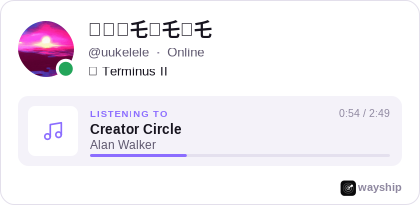](https://uukelele.wayship.link)
Live embed (updates instantly, for websites): https://wayship.link/embed/{key} in an iframe, with the same options. It posts its height to the parent page: { type: "wayship:embed", height }. Requested as an image instead (GitHub), it returns the card image.
<iframe src="https://wayship.link/embed/uukelele?theme=dark" width="380" height="240" style="border:0" allowtransparency="true" title="uuke on Wayship"></iframe>
Connected apps
Connect with Wayship lets any app — a desktop tool, a game overlay, a phone app you wrote, a WebView, a PWA — ask someone for access without registering a client ID or secret first. The app sends people to a page that describes it, the person approves, and the app gets its own app token (wsa_…) that works only for that app's peer signaling and its basic profile.
Open the connect page
https://wayship.link/connect?app=myapp&name=My+App&redirect=http://127.0.0.1:4321/cb&state=xyz
| Parameter | Meaning |
|---|---|
app |
Required. A slug: lowercase letters, digits, ., _ and -, up to 40 characters. |
name |
What to call the app on the consent screen (defaults to the slug, title-cased). |
icon |
Optional https:// picture for the badge. |
device_name |
Optional label for this connected device (e.g. "Ann's laptop"). The person can edit it. |
redirect |
Where to send the token back. http://127.0.0.1[:port]/…, http://localhost[:port]/…, https://<host>/…, or a custom scheme like zeta://callback. Omit it for manual mode. |
state |
Optional value echoed back untouched (use it to stop CSRF). |
Without a redirect, the person sees the token once and copies it into your app. With one, Wayship sends them back to it with ?token=wsa_…&account_id=…&handle=…&conn_id=…&state=… added (your existing query parameters are kept).
Manage a connection
All of these need a normal session (Authorization: Bearer <session>, or a logged-in browser):
| Endpoint | What it does |
|---|---|
POST /api/apps/authorize |
Approve a connection. Body { app, name?, icon?, device_name?, redirect?, state?, scopes? } → { conn_id, token, app, name, callback_origin, redirect_to?, account_id, handle }. scopes is filtered to peers and profile. |
GET /api/apps |
Every connected app and device: { id, app, name, icon, device_name, callback_origin, scopes, hint, created_at, last_seen, online_peers }[]. |
DELETE /api/apps/{conn_id} |
Disconnect one device. |
DELETE /api/apps/by-slug/{app} |
Disconnect every device of one app. |
GET /api/apps/me |
Who an app token belongs to: { account_id, handle, display_name, avatar_url, app, conn_id, device_name, scopes }. |
GET /api/apps/me and /api/peers/* are cross-origin callable (Access-Control-Allow-Origin: *) so desktop WebViews, Electron/Tauri apps and PWAs can use them from any origin. A wsa_… token is refused everywhere else: it can never read your settings, page, automations, notifications or transfers.
Peer signaling
Connected apps find each other (the same app slug, the same Wayship account) and talk directly over WebRTC. The API carries only presence and small signaling messages — never audio, video, files or your data. The WebSocket is wss://wayship.link/api/_ephaptic; authenticate with { token: "wsa_…" } (a normal session token also works, when you pass app explicitly).
| Endpoint | Body / query | Returns |
|---|---|---|
POST /api/peers/announce |
{ peer_id, device_name?, meta?, app? } |
{ self_peer_id, app, peers, ice_servers } — the first call is a join; later calls are heartbeats. |
GET /api/peers?app=… |
— | { app, peers, ice_servers } |
POST /api/peers/signal |
{ from_peer, to_peer?, kind, payload?, app? } — kind is offer, answer, ice or data; payload up to 64 KiB |
{ ok } |
POST /api/peers/leave |
{ peer_id, app? } |
{ ok } |
GET /api/peers/poll?peer_id=…&app=… |
— | { events }, for HTTP-only clients (the inbox is short-lived) |
peer_id is your own room name (^[A-Za-z0-9._:-]{4,64}$), not a Wayship account. Peer entries expire about 75 seconds after their last announce, so call announce on a timer (every ~30 seconds) and leave when closing. ice_servers comes from Wayship's STUN configuration, ready for RTCPeerConnection.
Live events arrive on the WebSocket as PeerEvent:
{ "app": "myapp", "kind": "signal", "from_peer": "laptop-1", "to_peer": "phone-1",
  "signal_kind": "offer", "payload": { "sdp": "…" }, "ts": 1760000000000 }
kind is join, leave or signal. The account owner also receives these events on their normal session, which is how the Connected apps page shows a green "online now" pill. Disconnecting an app in Settings cuts its token off immediately.
Errors
Errors are JSON with a human-readable message, which you can show to people as it is. The routes that are also RPC functions (/notifications) answer like this:
{ "code": "PLAN_LIMIT", "message": "That's today's 100 notifications on the free plan (it resets at midnight UTC). Plus has no limit.", "data": null }
/notify and /hooks use { "error": "…", "code": "…" }, and the rest { "detail": "…" }. Over the WebSocket, a failed call rejects with an error that has the same code and message.
| Status | Meaning |
|---|---|
| 400 | Something in the request is wrong (the message says what). |
| 401 | No sign-in, an expired session, or a key that can't do this. |
| 403 | Not public / not yours. |
| 404 | No such user, widget or notification. |
| 409 | Ambiguous (e.g. two widgets of a type). |
| 413 | Too big. |
| 429 | Rate limit or plan limit; wait and retry (Retry-After when known). |
Be gentle: cache what you read for at least 30 seconds, and use the WebSocket instead of polling when you want live data.
Examples
Waybar / status bar: connect with a "read" key, call snapshot() on connect, then update your bar on each media / presence event. For a widget's numbers, GET /api/users/{you}/widgets/{type} every few minutes.
Discord bot showing someone's music: GET /api/users/{name} and read media; or subscribe with { username } for live changes.
Website status dot: the live embed, or GET /api/users/{name} from the browser (CORS is open for public reads, no key), reading presence.discord_status or last_seen.
Cron job alerts: curl -H "Authorization: Bearer $WAYSHIP_KEY" -H "Tags: warning" -d "Backup failed" https://wayship.link/api/notify.
Home Assistant: a rest_command posting JSON to /api/notifications with your notify key in the headers.
For AI agents
Start from llms.txt. These docs are one Markdown file at /docs.md; /docs with Accept: text/markdown returns it too. When fetching them, please add goal, platform and agent query parameters (see llms.txt): it tells us what's hard to find.
Help
Questions, bugs, ideas: the Wayship Discord server.